

How to Optimize Your Google Business Profile for AI Overviews
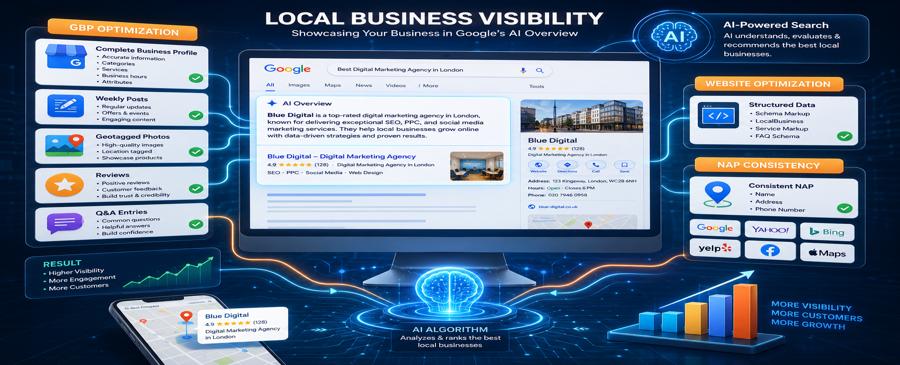
If you’ve searched Google recently, you’ve likely noticed AI-generated summaries appearing at the very top of the results page above the local pack, above organic listings, and above everything else. These are called Google AI Overviews, and they are fundamentally changing how local businesses get found online.
The businesses that appear inside those AI summaries are not there by accident. They have fully optimized Google Business Profiles that send the right signals to Google’s AI. And if your business isn’t showing up, your competitors are getting those clicks, calls, and customers instead.
In this guide, Map Ranks breaks down exactly how to optimize your Google Business Profile for AI Overviews in 2026 step by step so your business gets seen first, even in an AI-powered search world.
Key Takeaways
- High impressions don’t guarantee leads or customers
- Google Maps conversion optimization is essential for results
- Weak trust signals reduce calls and inquiries
- Reviews directly influence local lead generation
- Engagement signals affect rankings and conversions
- Optimized profiles generate more calls, not just views
What Are Google AI Overviews and Why Do They Matter for Local Businesses?
Google AI Overviews are AI-generated summaries that appear at the top of Google Search results. Powered by Google’s Gemini AI, these overviews pull verified data from multiple sources, including your Google Business Profile, to answer a user’s query directly on the search page.
Here’s why this matters for your business:
AI Overviews appear before everything else: above the Google 3-Pack, above paid ads, and above organic results
Nearly 46% of all Google searches have local intent, meaning AI Overviews increasingly feature local businesses
Businesses with complete, optimized GBP listings are significantly more likely to be cited in AI-generated summaries
Zero-click searches are rising: users get answers straight from AI without ever visiting a website, making your GBP your most important digital asset
How Google AI Overviews Pull Data From Your Google Business Profile
Google’s AI does not guess about your business. It reads, verifies, and cross-references your profile data across the web before deciding whether to feature you. Here are the key signals AI overviews rely on:
- Profile completeness: incomplete profiles are ignored by AI systems
- Review quantity and sentiment: AI reads review language to understand what your business does well
- Photo relevance and frequency: Google’s Vision AI scans your photos for business verification
- Posting activity: Frequent, keyword-rich posts signal an active, trustworthy business
- NAP consistency: your Name, Address, and Phone number must match across every directory
- Category accuracy: Your primary category tells AI exactly which searches to surface you for
Google Business Profile Optimization Checklist for AI Overviews
Use this checklist to audit your profile right now:
| Optimization Factor | Why It Matters for AI Overviews |
| 100% Profile Completion | Incomplete profiles are skipped by AI |
| Specific Primary Category | Tells AI which searches to surface you for |
| Keyword-Rich Description | AI reads description to match your business to queries |
| Weekly GBP Posts | Profile freshness is a top AI ranking signal |
| Weekly Geotagged Photos | Vision AI scans photos for business verification |
| 5+ New Reviews Per Month | Review volume and sentiment feed AI trust signals |
| Owner Responses to Reviews | Keyword-rich responses boost relevance signals |
| NAP Consistency Across Web | Inconsistent data triggers AI verification failure |
| Schema Markup on Website | Helps AI verify and trust your business data faster |
| Secondary Categories Added | Covers additional services for AI matching |
| Google Business Messages Enabled | Active messaging signals business legitimacy to AI |
10 Steps to Optimize Your Google Business Profile for AI Overviews
Step 1: Complete Every Single Field in Your Profile
This is non-negotiable. Google AI will not feature an incomplete profile in AI Overviews. Your Google Business Optimization must start with achieving a 100% profile completion score.
Step 2: Choose the Most Specific Primary Category Possible
Your primary category is the single most powerful ranking signal in your entire Google Maps optimization strategy. It tells Google’s AI exactly what your business does and which searches should surface your listing.
Step 3: Write a Business Description Built for AI Search
Your business description is one of the first places Google’s AI looks to understand what your business does and whether it’s a match for a user’s query.
Step 4: Post to Your Google Business Profile Every Week
Google’s AI gives heavy weight to profile activity and freshness. Businesses that haven’t posted in 30 or more days experience significant drops in AI Overview visibility.
Step 5: Upload Geotagged Photos Every Week
In 2026, Google’s Vision AI actively scans the photos on your profile to verify your business category, services, and location. High-quality, regularly updated photos are no longer optional; they are a direct AI ranking signal.
Step 6: Build and Manage Google Reviews Strategically
Google’s AI reads your reviews like a human would analyzing language, sentiment, and keywords to understand your business. Reviews are one of the strongest trust signals in the entire AI Overview ranking system.
Step 7: Add and Update Your Products and Services Section
Your Products and Services section is one of the most direct ways to tell Google’s AI exactly what your business offers. Yet most business owners either skip it entirely or fill it out once and never touch it again.
Step 8: Ensure NAP Consistency Across All Directories
Google’s AI cross-references your business information across the entire web before featuring you in AI Overviews. If your name, address, and phone number are inconsistent across directories, AI systems flag this as a verification failure and your visibility drops.
Step 9: Add Structured Data to Your Website
Google’s AI does not just read your GBP; it also crawls your website to verify that your profile information is accurate and consistent. Adding structured data (schema markup) to your website helps AI systems understand and trust your business faster.
Step 10: Monitor Your AI Visibility With Geo-Grid Reports
You cannot improve what you do not measure. To know whether your Google Maps optimization efforts are working, you need to track your visibility across your entire service area, not just from your business address.
Frequently Asked Questions
Does my Google Business Profile actually affect AI Overviews?
Yes, Google’s Gemini AI pulls verified data directly from your GBP to generate local business summaries. An optimized, complete, and active profile significantly increases your chances of being featured.
How long does it take to appear in Google AI Overviews after optimizing my GBP?
Most businesses see improvements in AI visibility within 30–60 days of consistent optimization, though results depend on your competition, location, and how complete your profile was to begin with.
Do Google reviews help with AI overviews?
Absolutely. Google’s AI reads review language and sentiment to verify what your business does and how well it performs. Businesses with consistent, keyword-rich reviews are far more likely to be cited in AI summaries.
Can small businesses appear in Google AI Overviews?
Yes, Google’s AI favors well-optimized, active, and trusted profiles over business size. A small business with a fully optimized GBP can easily outrank a large competitor with a neglected profile.
Is Google Business Profile the most important factor for local AI search?
One of the most important alongside reviews, NAP consistency, and website schema. Your GBP is the foundation that AI systems build their understanding of your business on.

Map Ranks is a local SEO agency that helps businesses get found fast on Google Maps and local pack. Our team specializes in Google Maps Marketing, SEO, and optimization strategies designed to boost your visibility, attract nearby customers, and grow your local presence. We make sure your local business stands out right where it matters; on the map and in front of the people searching for you.