

How to Optimize Your Google Business Profile for Ask Maps Queries
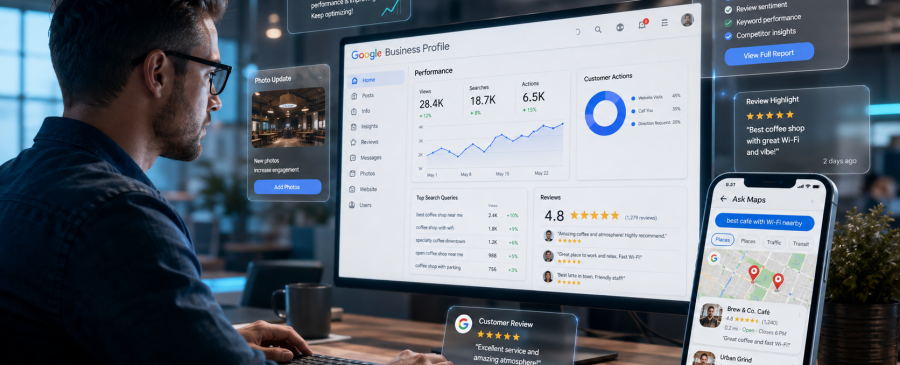
If you’ve searched for a local business on Google Maps recently, you may have noticed something different. Instead of just a list of results, you’re now getting a conversational answer that’s complete, specific, and instant.
This guide covers exactly what Ask Maps is, why Google Business Profile optimization 2026 is now inseparable from AI visibility, and the practical steps you need to take so your profile gets cited, not skipped. Our team has been tracking Ask Maps since it launched, and the pattern is already clear: profiles that answer questions win, and profiles that don’t get skipped.
Key Takeaways
- Ask Maps answers questions directly instead of showing a results list, so your profile has to do more of the talking.
- Gemini reads your reviews, attributes, services, and photos to decide who gets recommended.
- Profiles updated within the last 30 days get noticeably more AI visibility than stale ones.
- Specific, detail-rich reviews outperform generic five-star praise in Ask Maps answers.
- The Products tab is one of the most overlooked features for “who sells X nearby” queries.
- Every step that improves Ask Maps visibility also strengthens your EEAT signals for regular local search.
What Is Ask Maps, and Why Does It Matter for Your Business?
Ask Maps is a Gemini-powered conversational search feature built into Google Maps Optimizations that reads and synthesizes data from over 300 million business profiles. When a user asks a question, it doesn’t send them to a search results page. It formulates an answer using your profile’s reviews, attributes, services, photos, and linked website right then, right there.
This is a fundamental shift.
Before Ask Maps, your Google Business Profile primarily helped you rank in the local 3-pack. Now, your profile is also raw material for an AI that decides whether to recommend you in a natural language conversation.
What Ask Maps replaced: Google’s old Q&A section allowed users to ask questions and wait for business owners or the community to reply. That system is now largely retired. Gemini handles the answers automatically, pulling from whatever data it finds in your profile.
What this means for visibility: If your profile lacks structured data complete attributes, specific service descriptions, recent reviews that mention real details Ask Maps simply won’t have enough to work with. It will recommend a competitor whose profile gave better answers.
The New Logic Behind Google Maps AI Optimization
To win in Ask Maps, you need to understand how Gemini evaluates a profile. It looks for four things:
- Completeness: Is every field filled in? Categories, attributes, services, hours, photos, descriptions, and products. Gaps are blind spots.
- Freshness: Has this profile been updated recently? Profiles that haven’t added a post or photo in over 30 days experience measurable drops in AI visibility. Google treats stale profiles as potentially inactive businesses.
- Review specificity: Gemini doesn’t just count stars. It reads reviews. A review that says “The outdoor seating area is quiet and shaded, great for working“ teaches the AI something a five-star emoji review never could.
- Website alignment: Google now cross-references your GBP data with your linked website. If your profile says you offer “emergency plumbing” but your website never mentions it, your credibility score for that service takes a hit.
This is the new logic of Google Maps AI optimization, and it’s significantly more demanding than what local SEO required even 18 months ago. Your primary category plays into this too. If you haven’t reviewed it recently, our guide on choosing the right GBP primary category walks through why that one setting affects almost everything above.
5 Practical Steps to Optimize Google Business Profile for Ask Maps
1. Complete Every Attribute No Exceptions
Attributes are the raw ingredients. Ask Maps is used to answer specific queries. Questions like “Does this place have outdoor seating?” or “Is this business women-owned?” get answered directly from your attribute list.
In 2026, Google groups attributes into three sets:
- Service detail: outdoor seating, free Wi-Fi, parking, reservations required, curbside pickup
- Accessibility: wheelchair-accessible entrance, restroom, parking
- Identity: women-owned, veteran-owned, LGBTQ+ friendly
Go through every attribute available for your business category. Enable everyone that genuinely applies. This is free visibility that most businesses leave unclaimed.
2. Rewrite Your Services Section for Conversational Queries
Most businesses list services as bare labels: “Hair Cut,” “Oil Change,” and “Tax Filing.” That’s not enough for Ask Maps.
Gemini needs descriptive, specific content it can use to match conversational queries. Instead of “Hair Cut,” write: “A woman’s haircut includes consultation, wash, cut, and blow-dry. Specializing in curly and textured hair.“
3. Use the Products Tab as a Discovery Surface
This is the most overlooked feature in GBP right now.
When a user asks Ask Maps, “Does anyone nearby carry X?” or “Which local shop sells Y?” Google pulls answers directly from the Products tab of business profiles. Most businesses have it empty.
Even service-based businesses can use this creatively. A law firm can list flat-fee service packages as “products.” A salon can list menu items with prices. A digital agency can list service tiers.
4. Build Reviews That Teach the AI
Getting more reviews matters. But in 2026, getting better reviews matters more.
A review that says “Great experience, highly recommend” gives Gemini almost nothing to work with. A review that says, “Came in for a same-day dental cleaning; the staff was calm and quick, parking was easy, and they accept most insurance” that review is training data.
You can’t write reviews for customers, but you can guide them. When asking for a review, try: “If you have a moment, it really helps if you mention what service you used and anything specific you liked about the experience.”
5. Post Weekly Treats in GBP Like a Live Channel
A Google Post published today has significantly more ranking value than one published six weeks ago. Profile freshness is a documented signal for both the traditional local pack and the newer AI-driven surfaces.
Post content doesn’t need to be elaborate. What matters is regularity and relevance:
- A weekly update about a current offer or service
- A behind-the-scenes photo with a short caption
- An FAQ-style post answering a common customer question
- A seasonal announcement
Posts also appear in your local panel and can drive direct clicks before a user even visits your website.
What GBP Ask Maps Queries Look Like
You get one primary category and up to nine secondary categories. They are not equal in ranking weight, not even close.
| Old Google Maps Search | Ask Maps Conversational Query |
|---|---|
| dentist near me | Dentist near me that takes walk-ins and accepts Cigna insurance |
| café near me | Quiet café with Wi-Fi and outdoor seating for remote work |
| gym near me | Gym open before 6am with a sauna and no joining fee |
| accountant near me | Accountant who works with freelancers and small businesses |
| restaurant near me | Dog-friendly restaurant with vegan options and parking nearby |
Why Profile Authority Now Matters More
A profile with years of consistent reviews, a verified physical address, a well-maintained website, and active community engagement signals a real, experienced, trustworthy business exactly the kind Gemini wants to recommend.
Thin profiles, inconsistent NAP data, missing verification, or sudden spikes in reviews (which Google flags as artificial) all reduce your EEAT standing in the local AI ecosystem.
The good news: every step in this guide is also an EEAT-building action. Completing your profile thoroughly signals expertise. Responding to reviews signals engagement. Posting regularly signals that a real person is managing this business.
Not sure where your profile currently stands? Run our free Google Maps ranking checker; it takes a couple of minutes and gives you a full scan report showing exactly which of these signals your profile is missing.
Learn More
Final Thought
Ask Maps isn’t a future feature to prepare for. It launched in April 2026 and is already shaping which businesses get recommended in one of the highest-intent discovery moments that exist: someone actively asking Google Maps Rank for help finding exactly what you offer.
The businesses that will dominate local search over the next 12 months are the ones treating their Google Business Profile as a living, structured data asset, not a static listing they set up once and forgot about.
Start with the checklist above. Pick two or three items you haven’t done yet. Those are your highest-leverage moves right now. For our full approach to Google Maps visibility, head back to our homepage.
Frequently Asked Questions
What is Ask Maps, and how is it different from regular Google Maps search?
Ask Maps is a Gemini AI-powered feature inside Google Maps that answers conversational questions like “Which restaurant near me has outdoor seating and vegan options?” by reading data from business profiles, reviews, and websites. Unlike regular map searches, it synthesizes a personalized answer rather than just listing results.
Does Ask Maps use reviews to answer user questions?
Yes. Gemini reads the text of reviews to extract specific details—seating, parking, service quality, wait times, and accessibility and uses these details to answer queries. Reviews that mention specific, factual details perform better in this context than generic praise.
How often should I update my Google Business Profile in 2026?
At minimum, post twice a week, upload new photos every 2–4 weeks, and do a full profile audit once a month. Profiles inactive for more than 30 days see measurable drops in AI surface visibility.
Can service-area businesses (without a storefront) appear in Ask Maps?
Yes, as long as your service areas are accurately configured, your NAP is consistent, and your profile is actively maintained. Ask Maps uses service area data to match conversational queries from users in those locations.
What’s the difference between GEO and traditional local SEO?
Traditional local SEO focused on ranking signals for the 3-pack categories, citations, reviews. Generative Engine Optimization (GEO) goes further: it’s about structuring your profile so an AI can use it as a reliable source when generating answers. Both matter in 2026; GEO is the newer discipline that Ask Maps specifically rewards.
Can Ask Maps give wrong or inaccurate answers about my business, and what can I do about it?
Yes, it can, and this is one of the most common concerns raised by business owners. Since Ask Maps uses Gemini AI to automatically generate answers by pulling from your profile, reviews, and website in real time, if that information is inaccurate, incomplete, or outdated, Google fills the gaps on its own and not always correctly.

Map Ranks is a local SEO agency that helps businesses get found fast on Google Maps and local pack. Our team specializes in Google Maps Marketing, SEO, and optimization strategies designed to boost your visibility, attract nearby customers, and grow your local presence. We make sure your local business stands out right where it matters; on the map and in front of the people searching for you.