

Why Your Business Ranks in Google Maps for One Keyword but Not Another
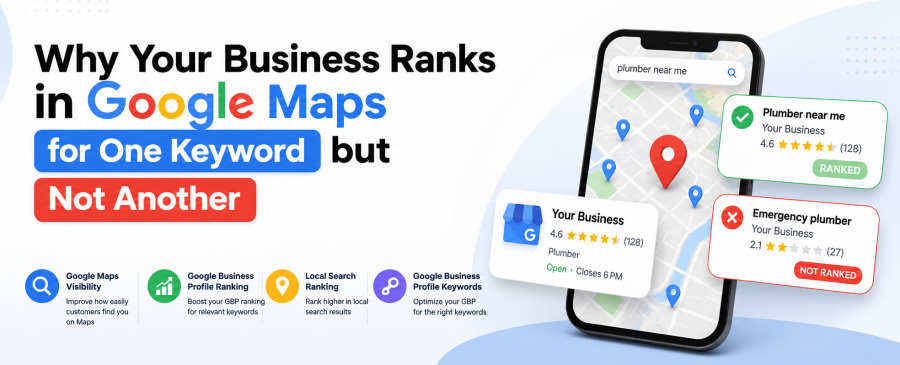
If you have ever Googled your own business and felt confused, you are not alone. We hear this from business owners every week. “We’re #2 for a plumber near me, but we don’t even show up for an emergency plumber.” Same business. Same address. Wildly different results.
This is one of the most common local search ranking questions we get at Map Ranks. Our team has managed hundreds of Google Business Profiles since 2018, and we have pulled apart this exact problem for HVAC companies, law firms, dentists, and home service businesses in nearly every market we work in. It usually is not luck, and it is not a Google glitch. It comes down to how Google reads your Google Business Profile keywords, your reviews, and your website content for each specific search phrase, and we can show you exactly where that breaks down.
As AI-driven search grows, this gap matters even more. Answer engines now pull results using AEO, GEO, and AIO signals (Answer Engine Optimization, Generative Engine Optimization, and AI Optimization), and they lean heavily on E-E-A-T: Experience, Expertise, Authoritativeness, and Trust. A profile that only signals relevance for one term simply will not surface for the others, in Maps or in AI-generated answers. Below, we walk through what we see in real audits, backed by the same process we use for our own clients.
Key Takeaways
- Google Maps ranks each keyword separately, not your business as a whole.
- Relevance, distance, and prominence are recalculated per search query.
- Weak or missing Google Business Profile keywords in your description, services, and posts hurt secondary terms.
- Reviews that repeat only one phrase train Google to associate you with that phrase alone.
- Fixing this requires keyword-specific content, not just a “complete” profile.
Your business ranks for one keyword but not another because Google Maps scores relevance, distance, and prominence separately for every search term, not for your business as a whole. If a keyword phrase is missing from your categories, service descriptions, posts, or review text, Google has no signal connecting your profile to that specific search, even if you rank well for a closely related one.
What’s Really Happening When Rankings Differ by Keyword?
Google Maps does not rank a business overall. It ranks a business against a specific search term, in a specific location, at a specific moment. Every query gets its own scorecard.
Think of it less like a leaderboard and more like a series of separate races. You might be the fastest runner in the 100-meter dash and still finish last in the marathon. Same athlete, different event, different training required.
Here is what actually shifts between one keyword and the next, based on what we see in real profile audits:
- Text match – does the literal phrase, or a close variation of it, actually exist in your description, services, or posts.
- Category alignment – is that specific service tied to a primary or secondary category, or just mentioned once in passing.
- Query-specific engagement – are people clicking, calling, or requesting directions after searching that exact term, which tells Google the match is working.
Your overall reputation barely moves between searches. What moves is whether Google can find real, specific proof that you offer that exact thing, and whether searchers act on it once they see you.
Why Google Business Profile Keywords Make or Break Secondary Terms?
Short answer: If a keyword phrase never appears anywhere in your Google Business Profile, Google has very little reason to connect your listing to that search.
Most business owners fill out their profile once and never touch it again. They write a general description, pick one primary category, and move on. That works fine for their most obvious search term. It does almost nothing for the ten other ways customers describe the same service.
Here is where we typically find the gap:
- The business description mentions only one service, not the full list.
- Services are added to the profile but never described in detail.
- Google Posts always use the same one or two phrases.
- Photos are uploaded with no context, so Google cannot connect them to a term.
We have audited hundreds of listings through our Google Maps SEO services, and the pattern is consistent. A single-category, single-phrase profile ranks well for one thing and stays invisible for everything adjacent to it.
The Category Trap: One Wrong Setting Can Cap Half Your Rankings
Your primary GBP category tells Google which “race” you are automatically entered into. Pick the wrong one, and no amount of content will fully fix it.
We see this constantly with service businesses that offer more than one thing. A company that does both roofing and gutter installation but sets “Roofing Contractor” as the only category will often struggle to rank for gutter-related searches, no matter how many times the word “gutter” appears in the description.
Secondary categories help. So does adding each service as a distinct, described item in the Services section, not just a bullet with no explanation. This is one of the fastest fixes we apply during a Google Maps ranking audit, and it often produces movement within a few weeks.
A Real Example: One HVAC Client, Two Very Different Rankings
We worked with an HVAC company that ranked in the top 3 for “AC repair” in its city but was nowhere to be found for “furnace repair,” despite offering both services for over a decade.
Here is what we found during the audit:
- Every review mentioned “AC” or “air conditioning.” Almost none mentioned heating.
- The GBP description led with cooling services and only briefly referenced heating in one line.
- Weekly posts had covered AC maintenance tips for months straight, with nothing on furnaces.
We rebuilt the services section to describe furnace repair, heating maintenance, and emergency heating calls as their own distinct listings. We also shifted the posting schedule to alternate between cooling and heating content, and we prompted the review request flow to ask about the specific service performed rather than a generic “how did we do.”
Within about ten weeks, the client’s furnace repair keyword moved from page 3 into the Maps 3-pack. Their AC repair ranking did not drop. It simply stopped being the only thing Google associated with the business. You can see how we structure this kind of work on our how it works page.
Reviews Are Quietly Training Google’s Keyword Association
Google scans review text for relevant terms. If every review says the same thing, your profile only builds authority around that one phrase.
This is the part most business owners never think about. You cannot write your own reviews, but you can influence what customers naturally mention. Industry research, including Moz’s annual local search ranking factors survey, consistently ranks review signals among the top drivers of local pack visibility. A simple follow-up question, like asking a customer to describe the specific job you completed, does more for keyword-level local search ranking than another round of generic five-star requests.
We recommend business owners:
- Ask staff to mention the service by name when requesting a review.
- Respond to every review using the specific service term, not a generic thank-you.
- Avoid copy-pasting the same reply across dozens of reviews.
Distance and Service Area Settings Matter More Than People Realize
A keyword tied to a location you have not clearly defined in your profile will rank inconsistently, even if everything else looks strong.
If your service area list is incomplete or outdated, Google Maps visibility for neighborhood-specific searches will be patchy. A business that serves five surrounding towns but only lists the main city in its profile will often disappear entirely once someone searches from a suburb ten minutes away.
How to Fix Uneven Rankings Across Keywords
Here is the checklist we run through with clients who come to us with this exact problem:
- Audit every keyword you actually want to rank for, not just your top one.
- Add or refine secondary GBP categories to reflect every core service.
- Write a distinct, keyword-specific description for each service listing.
- Rotate Google Posts across all services on a real schedule, not just your favorite one.
- Adjust your review request script to reference the specific job performed.
- Confirm your service area list is current and complete.
If this sounds like a lot to manage alongside running a business, that is exactly why agencies like ours exist. You can start with a free listing scan to see where your profile currently stands.
If you also want to understand how these same keyword signals affect visibility inside AI-generated answers, our earlier post on how to rank in AI search results and Google Maps at the same time covers that side of the picture in more depth.
Ready to see which keywords you’re actually ranking for? Grab your free listing scan today, or contact our team for a quick, no-pressure audit.
Frequently Asked Questions
Why does my business rank #1 for one search but not show up at all for a similar one?
Google Maps scores relevance separately for every query. If the second keyword phrase does not appear in your categories, description, services, or reviews, Google has no strong signal linking your business to that term.
Can I rank for multiple keywords with just one Google Business Profile?
Yes. One profile can rank for many related terms, but each service needs its own clear description, category alignment, and supporting review language. A single generic profile usually only serves one keyword well.
Does adding more categories always help Google Maps ranking?
It helps when the categories genuinely reflect services you offer and are supported by content and reviews. Adding categories with no matching evidence elsewhere on your profile rarely moves the needle on its own.
How long does it take to fix keyword-specific ranking gaps?
Most clients see initial movement within four to ten weeks, depending on competition and how outdated the profile was beforehand. Ongoing consistency matters more than a one-time fix.
Should I ask customers to mention specific services in reviews?
Yes. A simple, natural prompt asking what service was completed gives Google real, organic keyword signals tied to your business, which supports broader local search ranking over time.

Map Ranks is a local SEO agency that helps businesses get found fast on Google Maps and local pack. Our team specializes in Google Maps Marketing, SEO, and optimization strategies designed to boost your visibility, attract nearby customers, and grow your local presence. We make sure your local business stands out right where it matters; on the map and in front of the people searching for you.